


 BUY NOW AND GET FREE SHIPPING
On all orders over 500,- (DK only)
BUY NOW AND GET FREE SHIPPING
On all orders over 500,- (DK only)
 1-2 DELIVERY DAYS
Order before 12 noon and we will ship the same business day
1-2 DELIVERY DAYS
Order before 12 noon and we will ship the same business day
 14 DAY RETURN RIGHT


Couldn't load pickup availability
20+ in stock : 1-2 weekdays


Free shipping on orders over 500 DKK in DK

Ships from Roskilde DK

Local service center in Roskilde

1 year warranty

Customer Service
Email: hello@3dsaga.com
Phone: +45 69 15 31 11
All weekdays from 10:00 - 15:00
Showroom:
Monday - Thursday: 09:30 – 15:30
Friday: 09:30 – 15:00


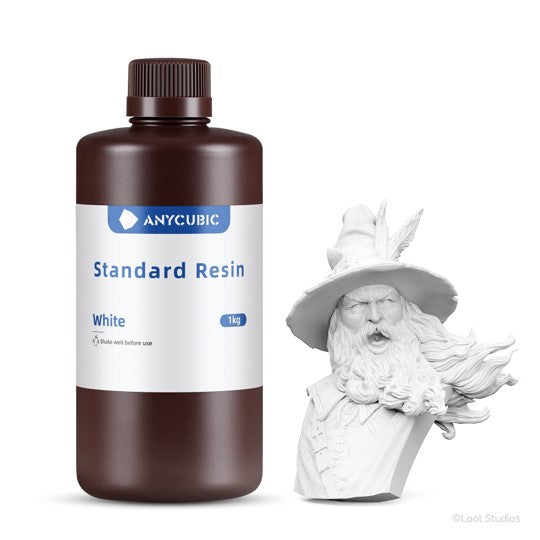
Anycubic Standard Resin
1 Liter resin

Perfect for beginners
With years of experience in 3D printing, Anycubic has optimized this standard resin for higher printing success and maximum user-friendliness. It delivers well-balanced and reliable performance, making it an obvious choice for both beginners and experienced users.


High level of detail
A volumetric shrinkage of only 5% provides increased resistance to deformation and high dimensional accuracy, ensuring that even fine details are reproduced precisely.
Fast resin flow for exceptional precision
Anycubic resin has low viscosity and excellent flow properties, reducing overall print time and increasing printing efficiency. Rapid air bubble venting ensures sharp details and smooth surfaces. At the same time, it provides strong adhesion to the build plate, reducing the risk of the model detaching or print failure.

A wide range of vibrant colors
Anycubic resin delivers pure and clear colors with multiple color options, ensuring consistent results across your prints. The finished models have an exceptionally smooth surface, making them easy to paint and suitable for various types of post-processing.


Low odor and safe to use
Anycubic resin is developed with a special low-odor formulation, minimizing discomfort during printing and providing a more pleasant working experience.

Many application possibilities
The resin is compatible with all LCD and DLP printers using 405 nm UV curing technology, and yields the best results with Anycubic LCD printers.

Applications

Model view

Download
Specifications
| Category | Specification |
|---|---|
| Preparation | |
| Preparation before printing | Shake thoroughly before use |
| Printing environment | 20–40 °C |
| Print parameters | |
| First layer exposure time | 20–40 sec. |
| Normal exposure time | 2–3.6 sec. |
| Printing temperature | 20–50 °C |
| Physical properties | |
| Material | Photopolymer resin |
| Wavelength | 365–405 nm |
| Viscosity | 200–230 mPa·s (25 °C) |
| Density | 1.13 g/cm³ |
| Mechanical properties | |
| Hardness | 84–86 HD |
| Tensile strength | 40–50 MPa |
| Elongation at break | 12–16 % |
| Flexural modulus | 50–60 MPa |
| Flexural strength | 1400–1600 MPa |
| Young's modulus | 1600–1800 MPa |
| Izod impact strength | 103 J/m |
| Volume shrinkage rate | 4.5–5.5 % |
| Post-processing | |
| Washing time | ≥3 minutes |
| UV wavelength | 405 nm |
| Curing temperature | 18–30 °C |
| UV intensity | 25,000–30,000 µW/cm² |
| Curing time | 3 minutes |
| Disposal | |
| Disposal of cured resin | Resin post-cured with UV light must be treated as plastic waste |
Recommended print parameters
| Printer model | Layer thickness | Exposure time | Light-Off time | Bottom layer exposure time | Number of bottom layers | Anti-aliasing level | Z-lift distance | Z-lift speed | Z-retract speed |
|---|---|---|---|---|---|---|---|---|---|
| Photon P1 | 0.05 mm | 2 s | 2 s | 20 s | 1 | 4 | 5 mm | 3 mm/s | 3 mm/s |
| Photon Mono M7 Max | 0.05 mm | 2 s | 0.5 s | 30 s | 5 | 1 | 8 mm | 6 mm/s | 6 mm/s |
| Photon Mono M7 Pro | 0.1 mm | 2.2 s | 0.5 s | 25 s | 3 | 1 | 4 mm | 15 mm/s | 15 mm/s |
| Photon Mono M7 Pro | 0.05 mm | 2 s | 0.5 s | 25 s | 4 | 1 | 8 mm | 6 mm/s | 6 mm/s |
| Photon Mono M7 | 0.05 mm | 2.2 s | 0.5 s | 25 s | 4 | 1 | 8 mm | 6 mm/s | 6 mm/s |
| Photon Mono 4 Ultra | 0.05 mm | 2.6 s | 1 s | 30 s | 5 | 1 | 5 mm | 8 mm/s | 8 mm/s |
| Photon Mono 4 | 0.05 mm | 2.8 s | 1 s | 30 s | 5 | 1 | 6 mm | 4 mm/s | 6 mm/s |
| Photon Mono M5s Pro | 0.05 mm | 3.6 s | 0.5 s | 30 s | 5 | 1 | 8 mm | 6 mm/s | 6 mm/s |
| Photon Mono M5s | 0.05 mm | 2.8 s | 0.5 s | 25 s | 5 | 1 | 5 mm | 5 mm/s | 6 mm/s |
| Photon Mono M5 | 0.05 mm | 2.8 s | 0.5 s | 25 s | 5 | 1 | 8 mm | 5 mm/s | 6 mm/s |
| Photon Mono X6Ks | 0.05 mm | 2.5 s | 0.5 s | 20 s | 5 | 1 | 8 mm | 3 mm/s | 4 mm/s |
| Photon Mono X 6K | 0.05 mm | 2 s | 0.5 s | 23 s | 6 | 1 | 8 mm | 2 mm/s | 3 mm/s |
| Photon M3 Max | 0.05 mm | 3 s | 2.5 s | 50 s | 6 | 1 | 10 mm | 2 mm/s | 3 mm/s |
| Photon M3 Premium | 0.05 mm | 2.5 s | 0.5 s | 25 s | 4 | 1 | 8 mm | 6 mm/s | 6 mm/s |
| Photon Mono 2 | 0.05 mm | 2.5 s | 1 s | 25 s | 5 | 1 | 6 mm | 4 mm/s | 6 mm/s |
| Photon Mono X2 | 0.05 mm | 2.5 s | 0.5 s | 20 s | 5 | 1 | 8 mm | 2 mm/s | 3 mm/s |
| Photon Mono 4K | 0.05 mm | 2 s | 0.5 s | 40 s | 6 | 1 | 6 mm | 4 mm/s | 6 mm/s |
Colors & Hex-codes
| Color | Hex Color Value | Color Display |
|---|---|---|
| White | #EFF0F1 | |
| Black | #212721 | |
| Gray | #7E93A7 | |
| HD Gray | #768692 | |
| Beige | #FCC89B | |
| Purple | #825DC7 | |
| Blue | #00A3E0 | |
| Transparent Green | #009A17 | |
| Clear | / | |
| Transparent Blue | #077CAB | |
| Transparent Red | #D22630 | |
| Transparent Yellow | #D5BF39 | |
| Smoky Black | #688197 | |
| Crimson Clay | #976459 |
Instructions for use
1. Before use
- Shake the resin bottle thoroughly before use.
- Clean the resin vat and build plate.
- Ensure the bottom of the resin vat is completely transparent.
- Check that the FEP/release film is undamaged.
- Verify that the correct print settings are selected.
- Recommended printing environment: 20–35 °C to avoid temperature-related printing errors.
2. During use
- Unscrew the cap of the bottle and remove the sealing film.
- Pour resin into the vat without exceeding the maximum mark.
3. After use
Use the provided tools for post-processing:
- Scraper
- Side cutters
- Tweezers
- Nitrile gloves
- Cleaning fluid with at least 95% IPA (isopropyl alcohol)
4. Post-processing
- Remove the model from the build plate with the scraper and remove the support structures.
- Clean the model in an Anycubic Wash & Cure machine for approximately 10 minutes with at least 95% IPA or a suitable cleaning agent.
- Dry the model by air drying, with compressed air, or in a drying chamber to prevent moisture absorption and cracking.
- Post-cure the model for 3–5 minutes.
- Reuse excess resin by filtering it through a 100-mesh sieve.
Precautions
- Store at room temperature and protected from direct light.
- The recommended operating temperature is above 20 °C. Low temperatures reduce print success, while high temperatures can cause pigments to settle faster.
- If pigments settle, stir the resin with a plastic spatula or shake the bottle thoroughly.
- The resin hardens in sunlight. Therefore, print in a dimly lit and well-ventilated room, or keep the printer covered.
- Remove models immediately after washing to prevent degradation of material properties.
- Always wear nitrile gloves and safety glasses, and avoid contact with skin and eyes.
- Waste disposal: Fully cure all excess resin before disposing of it as solid waste.
- Ensure good ventilation and keep liquid resin away from pregnant women, children, and pets.
Note: Material properties may vary depending on the printer, post-curing method, and testing equipment. For safety data sheets and certifications (MSDS, REACH, RoHS, EAN, and TDS), please refer to the product documentation.
Frequently Asked Questions (FAQ)
Which models are suitable for printing with Standard Resin?
Standard Resin is suitable for printing common anime and game figures, architectural models, appearance prototypes, and structural development prototypes.
Does it have a strong odor? What can be used to clean and cure the models?
Standard Resin has a slight odor and can be cleaned with isopropyl alcohol. A Wash & Cure machine is recommended for curing the models.
Where can I find the recommended printing parameters for Anycubic printers when using Standard Resin?
You can find the recommended printing parameters on this product page. If you do not achieve the desired results, please contact our support team for assistance.
Is the resin certified? Where can I download the relevant certifications?
All Anycubic resins comply with RoHS, REACH, and SDS certifications and have corresponding certification reports. Click here to download the resin's MSDS.
How do I handle unused resin after printing?
It can be poured back into the original bottle through a resin filter (to avoid residual particles). Store it in a dark, cool, and dry place.
It is also not recommended to mix resins from different brands, colors, or types. If you wish to mix resins yourself, you must adjust and test the print settings yourself.
Where can I download the model for free?
Click here to download free models from Makeronline.
Where can I see parameter comparisons for different resins?
You can click here to see parameter comparisons for currently available resins.
What should I do if I accidentally get resin on my skin?
Immediately wash the area with soap and water. Note that alcohol should not be used for direct wiping of the skin, as it can cause the resin to penetrate further into the skin.
If you experience allergic reactions, redness, swelling, or a burning sensation, seek medical attention immediately. Prolonged exposure can cause dermatitis or chronic allergies.
It is always recommended to avoid handling with bare hands and to use appropriate protective equipment.