


 BUY NOW AND GET FREE SHIPPING
On all orders over 500,- (DK only)
BUY NOW AND GET FREE SHIPPING
On all orders over 500,- (DK only)
 1-2 DELIVERY DAYS
Order before 12 noon and we will ship the same business day
1-2 DELIVERY DAYS
Order before 12 noon and we will ship the same business day
 14 DAY RETURN RIGHT


Couldn't load pickup availability
20+ in stock : 1-2 weekdays


Free shipping on orders over 500 DKK in DK

Ships from Roskilde DK

Local service center in Roskilde

1 year warranty

Customer Service
Email: hello@3dsaga.com
Phone: +45 69 15 31 11
All weekdays from 10:00 - 15:00
Showroom:
Monday - Thursday: 09:30 – 15:30
Friday: 09:30 – 15:00


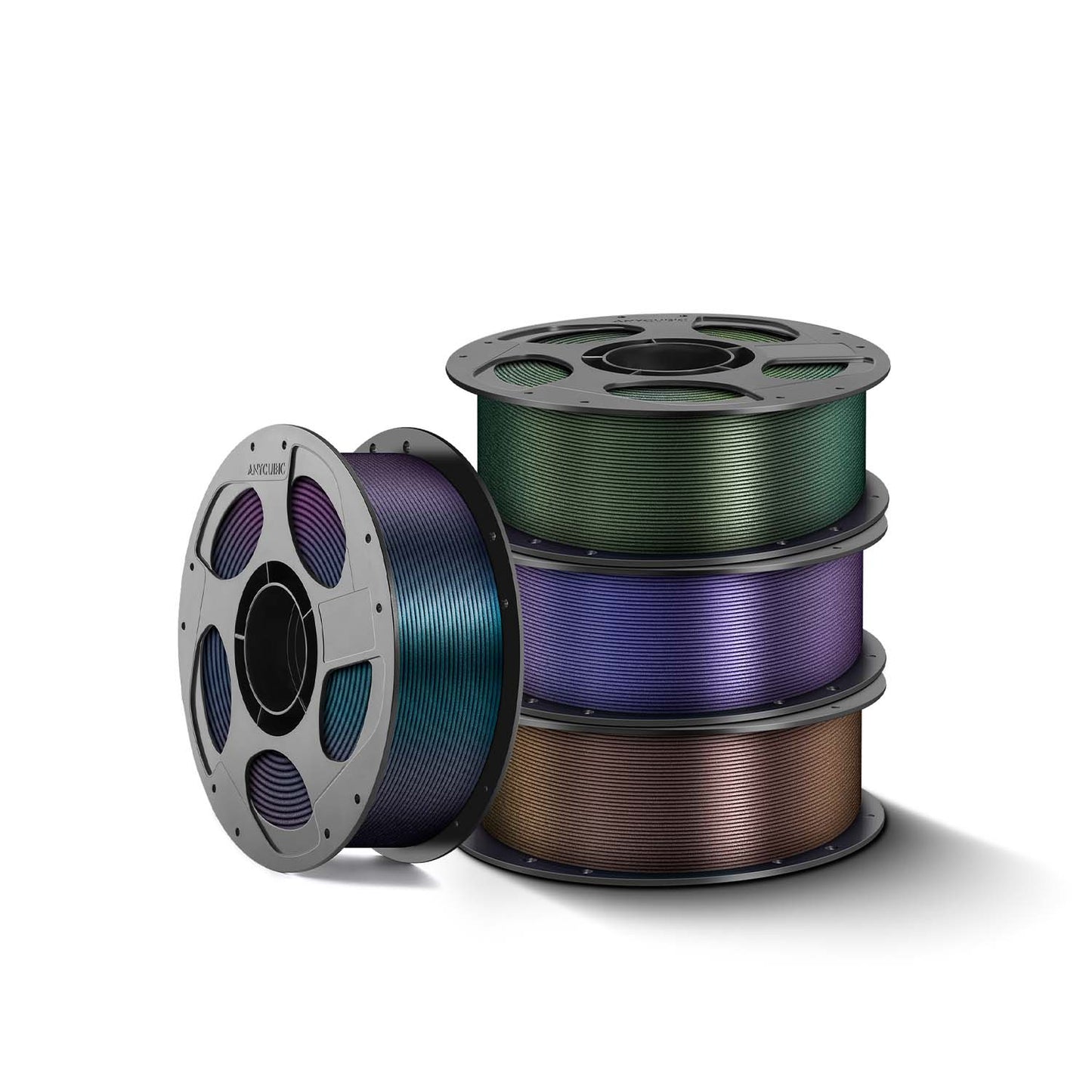
Anycubic PLA Galaxy
1.75mm 1kg
Product Features
● Dynamic color variations
● Beautiful starry sky effect
● Durable model surface
● Easy to print with
● Increased efficiency with intelligent identification (RFID)
Anycubic PLA Galaxy Filament
Varying colors from different angles | Starry sky effect | Durable surface finish | Easy to print | Intelligent identification

Dynamic Color Variations
PLA Galaxy features an iridescent surface effect that reveals new colors with every movement and from different angles. It is the ideal filament for creating models that capture attention – from marine creatures and design figures to impressive works of art.

Beautiful Starry Sky Effect
PLA Galaxy is infused with microscopic glitter powder, creating an elegant starry sky effect. This unique composition conceals layer lines and gives your prints a flawless, metallic sheen, perfect for detailed models and decorative items.

Durable Model Surface
Using premium raw materials, Anycubic PLA Galaxy is developed for optimal glitter powder adhesion. Your models maintain a flawless surface without flaking and retain their vibrant glitter effect for many years.

Easy to Print
Anycubic PLA Galaxy uses standard PLA printing settings and provides a user-friendly plug-and-play experience. Enjoy consistent and reliable results from start to finish – even after refilling the filament.

Increased Efficiency with Intelligent Identification
The filaments are equipped with intelligent identification chips that integrate seamlessly with ACE Pro. This allows for automatic detection of print information and enhances the overall printing experience.
* The intelligent identification function requires an internet connection and Anycubic filaments with intelligent identification support.

Reusable Filament Spool
The reusable filament spool features a threaded system designed for increased stability when used with spool-less filaments. The design significantly reduces the risk of tangling, loose filament, and operating errors.

Model Display

Filament Installation
1. Labeling the Filament
Remove both labels and both chips (if present). Affix new chip labels to both spool flanges.
2. Inserting the Filament
Open the spool, align the filament with the locking mechanism, and click it into place.
3. Locking the Spool
Close the spool, press it firmly together, and twist until you hear a "click", confirming it is locked.
4. Preparing the Filament
Once the spool is locked, remove the securing strap and feed the filament through the spool hole.

Specifications
| Category | Specification |
|---|---|
| Preparation | |
| Drying before use | Recommended |
| Drying conditions | 55–60 °C for 6–8 hours |
| ACE compatibility | Compatible |
| Recommended nozzle size | 0.4 mm or larger |
| Printing Parameters | |
| Print temperature | 200–230 °C |
| Heated build plate temperature | 60–65 °C |
| Recommended print speed | 40–260 mm/s |
| Maximum volumetric print speed (flow) | 12 mm³/s |
| Physical Properties | |
| Density | 1.23 g/cm³ |
| Melt index | 5.85 g/10 min (190 °C / 2.16 kg) |
| Vicat softening temperature | 56 °C |
| Heat deflection temperature (0.45 MPa) | 53 °C |
| Mechanical Properties | |
| Young's modulus | 3500 ± 300 MPa |
| Elongation at break | 12 ± 2 % |
| Flexural modulus | 3500 ± 200 MPa |
| Izod impact strength (X-Y) | 25 ± 3 kJ/m² |
| Tensile strength (Z) | 36 ± 1 MPa |
| Filament Characteristics | |
| Recommended print applications | Decorative parts and artworks |
| Reusable filament spool | Supported |
Download
Colors and Hex Codes
| Color | Hex Code | Display |
|---|---|---|
| Galaxy Brown | #5E4241 | |
| Galaxy Green | #4E5B31 | |
| Galaxy Blue | #1F2A44 | |
| Galaxy Purple | #491D70 |
Frequently Asked Questions (FAQ)
Will the glitter powder rub off or fall off the model over time?
No. The filament is made from premium materials with excellent adhesion, ensuring a durable surface without flaking or glitter loss.
Do I need special printer settings to print with PLA Galaxy filament?
No. PLA Galaxy uses standard PLA printing settings and provides a reliable plug-and-play experience, which is also ideal for beginners.
Does the Intelligent Identification feature require additional setup or operation?
No. No extra setup is required. Supported 3D printers automatically read the filament information, providing a seamless and user-friendly experience.
Where can I find settings for different filament types?
Click here to see the recommended settings for different filament types.
Where can I download models for free?
There are many different sites such as Printables, Cults3d, Makerworld, and many others. Anycubic recommends their own platform Makeronline.com. Click here to download free models.
What should I do if the filament I received has issues with quantity, color, or other defects?
If there are any issues with the filament you received, please contact our support team for assistance.