


 BUY NOW AND GET FREE SHIPPING
On all orders over 500,- (DK only)
BUY NOW AND GET FREE SHIPPING
On all orders over 500,- (DK only)
 1-2 DELIVERY DAYS
Order before 12 noon and we will ship the same business day
1-2 DELIVERY DAYS
Order before 12 noon and we will ship the same business day
 14 DAY RETURN RIGHT


Couldn't load pickup availability
6 in stock : 1-2 weekdays


Free shipping on orders over 500 DKK in DK

Ships from Roskilde DK

Local service center in Roskilde

1 year warranty

Customer Service
Email: hello@3dsaga.com
Phone: +45 69 15 31 11
All weekdays from 10:00 - 15:00
Showroom:
Monday - Thursday: 09:30 – 15:30
Friday: 09:30 – 15:00


Bambu Lab Light Staff with sound effects Kit
Product Features
-
Immersive Motion Interaction (Included in all kits)
-
Optimized Audio Performance (Included in all kits)
-
Bluetooth Smart Control (Included in all kits)
-
Dynamic Pixel Light Effects (Exclusive to Kit 01)
-
Aluminum Alloy Core Shaft (Exclusive to Kit 01)
Please note, the product does not include the 3D printed parts shown in the main image.
Introduction
The Motion-Activated Sound and Light Props kit is a multifunctional toolkit specifically developed for handheld props. It combines light, sound, and motion sensors to deliver a personalized and immersive experience. High-brightness LED strips, paired with diffuse pearl foam, create soft and natural lighting effects. An integrated speaker chamber ensures clear sound quality, while the built-in IMU motion sensor detects movements in real time, triggering corresponding light and sound effects for actions such as power-on/off, swinging, striking, or bumping.
The kit is available in two configurations: Kit 01 (complete set including LED strips, aluminum alloy tube, and diffuse pearl foam, suitable for large props like the Golden Staff) and Kit 02 (compact version, where the user adds their own 256RGB 5050LED 815MM LED light strip, optimized for swords/daggers). Unlike purely decorative prop kits without hardware, this kit is more than just a prop – it's your creative partner. It supports extensive customization of appearance, light effects, and sound effects, and is compatible with various prop forms such as the Golden Staff, double-bladed weapons, and pixel lightsabers. With the help of 3D printing and professional design, it opens up infinite possibilities for your imagination. With app connectivity, users can easily adjust light colors, flicker frequencies, and even upload custom light and sound effects, making it easy to create a unique and personalized prop.
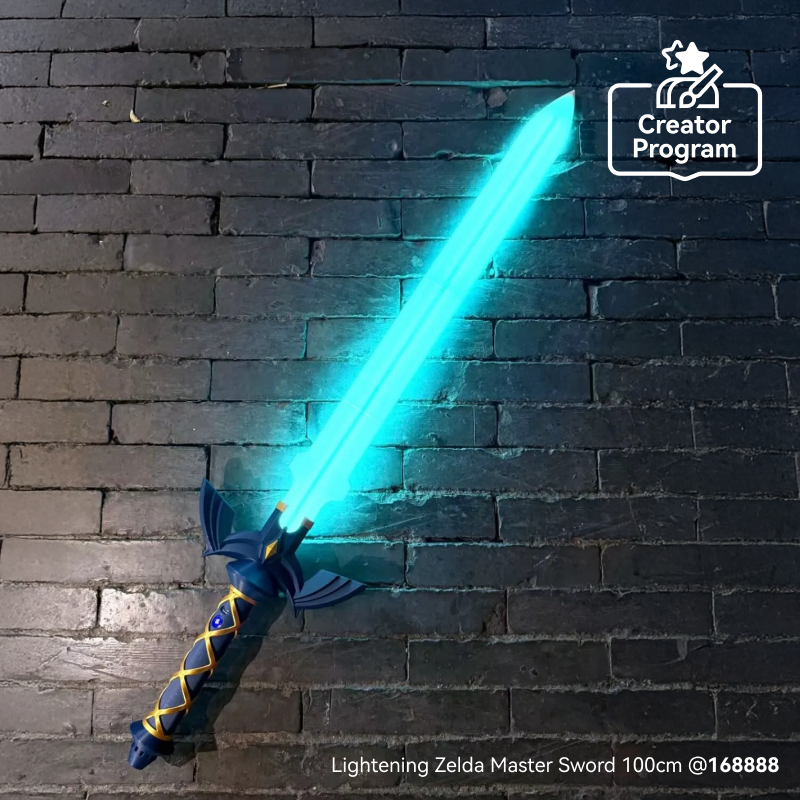
Creator Program: The Creator Program is a collaborative program between Bambu Lab and creative designers. Creators unleash their creativity by designing 3D print models, while Bambu Lab provides compatible hardware kits for these designs.
| Model Links | Creators | Compatible Kit |
| 1:1 Ruyi Jingu Bang Wukong Staff Weapon | @DaDaland | Kit 01 |
| Lightening Zelda Master Sword 100cm | @168888 | Kit 01 OR Kit 02 |
| Double Bladed Lightsaber | @joel.he | Kit 01 |
| Brick Star Wars Lightsaber | @collinliao | Kit 01 OR Kit 02 |
| Cyber Golden Cudgel | @storm879 | Kit 01 |

Product Specifications
Hardware

| Item No. | Component | Description | Size | Wire Length |
|---|---|---|---|---|
| 1 | Speaker | Used for sound effects. Connects via 2P cable to the main board. | 23.8(φ) × 12(h) mm | 50 mm |
| 2 | Control Panel | Includes 1 power button, 1 USB-C charging and power port, 4 connection ports for LED, buttons, and speakers. | 41 × 13 × 21 mm | 45 mm |
| 3 | Battery | Supports 18650 battery: 3.7 V, 2600 mAh. Battery life: 50–60 min (depends on power consumption). Charging time: approx. 4–5 hours. Charges via USB-C with 5V/1A input. Note: does not support fast-charging protocols. | 18.5(φ) × 68.5(h) mm | 70 mm |
| 4 | Main Board | Equipped with built-in 32G TF card. Displays various light and sound effects with integrated motion sensor. Has two dedicated ports for accessory modules. Supports multiple power modes. Includes connector for 18650 battery and internal overcharge/discharge protection. | 70 × 16 × 6.5 mm | LED strip 1: 600 mmLED strip 2: 750 mmBattery: 30 mm |
| 5 | Set Screw | Used to secure the 3D printed base inside the aluminum tube. | M3 × 12 | / |
| 6 | Self Tapping Screw | Used to secure the main board and button board to the 3D printed PCB base. | BT2 × 5 | / |
| 7 | Connection Part | / | 35(φ) × 30(h) mm | / |
| 8 | Round Threaded Brass Heat-Insert Nut | Used to secure the 3D printed base inside the aluminum tube. | M3 × 4 × 5 | / |

| 9 | Light Diffusion Foam | Light-diffusing foam that can be inserted into the LED strip to ensure uniform and smooth light distribution. | 29(φ) × 440(h) mm | / |
| 10 | Pixel LED Strip Light | One side consists of 62 high-brightness LED beads, totaling 124 beads on both sides, creating vibrant and dynamic pixel LED light effects. The strip connects to the main board via a 3P connector. | 435 × 10 × 1 mm | 95 mm |
| 11 | Aluminum Tube | / | 35(φ) × 600(h) mm | / |
| 12 | Aluminum Tube with Button and Charging Port | Equipped with charging port, button hole, and reset hole. The tube houses the main board and battery. | 35(φ) × 600(h) mm | / |
Software
| Component | Description |
|---|---|
| APP | Connects to the device via Bluetooth, allowing the user to adjust light and sound effects on their phone. Supports both Android and iOS. |
| Light Effects | Over 20 pre-installed light effects, supports custom light effects and allows for designing your own effects. |
| Sound Effects | Includes 27 sound effects and supports updating the sound library via TF card to add more desired effects. |
| Motion Sensor | The motion sensor triggers light and sound effects based on the characteristics of the motion, enhancing the immersive experience. |
In the Box
| Main Board | 1 pc | 1 pc |
| Control Panel | 1 pc | 1 pc |
| Speaker | 1 pc | 1 pc |
| Battery | 1 pc | 1 pc |
| Pixel LED Strip Light | 2 pcs | / |
| Light Diffusion Foam | 2 pcs | / |
| Aluminum Tube with Button and Charging Port | 1 pc | / |
| Aluminum Tube | 1 pc | / |
| Connection Part | 1 pc | / |
| M3x12 Set Screw | 2 pcs | 2 pcs |
| M3x4x5 Round Threaded Brass Heat-Insert Nut | 2 pcs | 2 pcs |
| BT2x5 Self Tapping Screw | 5 pcs | 5 pcs |
Documentation
FAQ - Frequently Asked Questions
Precautions to avoid common installation risks during equipment assembly
-
Ensure correct polarity when installing batteries to avoid short circuits.
-
Be careful not to bend wires excessively when connecting the LED strip and button board to prevent damage.
-
Ensure connectors and ports are properly aligned and avoid using excessive force to prevent damage to interfaces.
Charging indicator does not light up
- Try replacing the charger. A 5V 1A power supply is recommended. It is not recommended to use a fast-charging adapter.
Charging indicator lights up, but the device cannot be turned on
-
Use a screwdriver to press into the reset hole and perform a reset operation to restart the system.
-
Disassemble the aluminum tube, remove the internal structure, and press the reset button on the main board to restart. Ensure the battery connector is properly plugged in.
Device makes sound when powered on, but the light strip does not light up
- Disassemble the aluminum tube, remove the internal structure, and check if the Pixel LED strip light connections are normal.
Light strip lights up when powered on, but there is no sound
-
Use the mobile app to connect to the device via Bluetooth, enter the control menu, check and adjust the volume, and confirm if the device is muted.
-
If the problem persists, disassemble the aluminum tube, remove the internal structure, and check if the speaker connections are normal.
There is sound when powered on, but it is distorted
-
Disassemble the aluminum tube, remove the internal structure, and check if the speaker diaphragm is damaged.
-
If you have changed the sound effect, ensure the audio file format and level are correct (44.1 kHz, 16-bit, mono WAV).
Cannot turn on the device.
- Use a screwdriver to press into the reset hole and attempt to restart the system.
- If that doesn't work, disassemble the aluminum tube, remove the internal structure, and press the reset button on the main board to restart.
- Check that the battery connector is properly plugged in and that the TF card is correctly inserted. If the above steps do not resolve the issue, try updating the firmware.
- Contact us for the latest firmware package and update instructions.